To track your truck’s location with the Truck Lagbe Owner app, you need two things: a TL Tracker GPS device installed on the truck and an active GPS subscription. Once both are in place, open the Owner app, go to the Truck Location (ট্রাকের অবস্থান) tab, and tap Track (ট্র্যাক করুন) on the truck you want to follow. You can now buy or renew the subscription in the app and pay via SSLCommerz with a card, bKash, Nagad, or net banking.
This guide shows how to get TL Tracker, how to buy or renew a subscription step by step, how to track a truck, and what the tracker can do for your trucking business.
What is TL Tracker?
TL Tracker is Truck Lagbe’s GPS tracking service for trucks and pickups. A small GPS device is fitted to the vehicle, and its location and alerts appear in the same Truck Lagbe Owner app you use to take trips. That means one app for finding work and for keeping an eye on where each truck is, when it stops, and how fast it is driven.
Regular monitoring matters in the truck business. To deliver goods safely and on time, an owner needs to know where the truck is, when the driver stops, and how the trip is going. A GPS tracker gives you that information without having to call the driver every hour.
How to get a TL Tracker device
To get a TL Tracker installed on your truck or pickup, contact Truck Lagbe on 09638000245. You can also see the TL Tracker GPS bundles on TL Shop, Truck Lagbe’s online shop, which in October 2026 listed the device with 1, 6 or 12 months of subscription included and free installation in Dhaka and Chattogram.
If you have not added your vehicle to the app yet, first register your truck in the Truck Lagbe Owner app. The app is available on Google Play.
How to Buy or Renew a TL Tracker GPS Subscription
Open the Truck Lagbe Owner app, tap on the “Truck Location” (‘ট্রাকের অবস্থান’) tab, and then go to the “List” tab. Here, you can view the trucks fitted with a TL Tracker GPS device. You can also switch to the Map view and check each truck’s GPS subscription status.
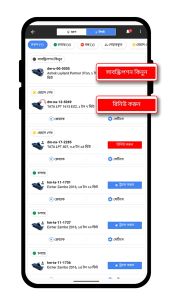
- Find the truck you want to track. If its subscription has not been purchased, tap “সাবস্ক্রিপশন কিনুন” (Subscribe). If the subscription has expired, tap “রিনিউ করুন” (Renew).
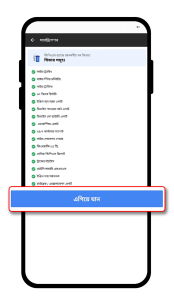
- Review the GPS subscription features shown in the app. Tap “এগিয়ে যান” (Continue) to proceed to package selection.
3. Choose your preferred available subscription duration. The app displays the available packages, including any applicable offers, at the time of purchase. Tap the package you want to select.
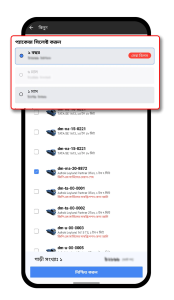
4. Select the truck or trucks for which you want the subscription. The selected vehicles appear with a checked box. Review the vehicle count and payable total shown at the bottom of the screen.
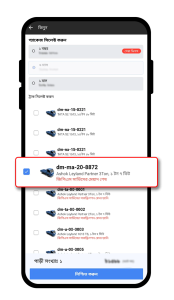
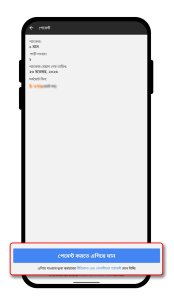
5. Tap “নিশ্চিত করুন” (Confirm). On the payment summary screen, review the chosen package, number of vehicles, subscription expiry information and total bill.
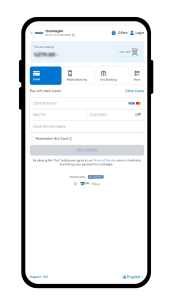
6. Tap “পেমেন্ট করতে এগিয়ে যান” (Proceed to Payment) to open the secure SSLCommerz payment gateway.
How to Complete Your TL Tracker Subscription Payment
On the SSLCommerz checkout page, select one of the payment methods currently available. These may include card payment, mobile banking, net banking and other supported options. Availability depends on the payment gateway.
- For a card payment, choose Card and enter the required card details on the secure checkout page.
- For mobile banking, select Mobile Banking and choose the mobile financial service you want to use, such as bKash or Nagad if available.
- For net banking, select Net Banking and choose your preferred supported bank. Other available payment methods can be viewed under More.
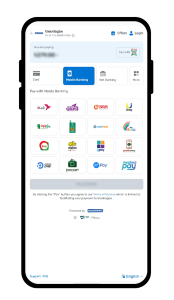
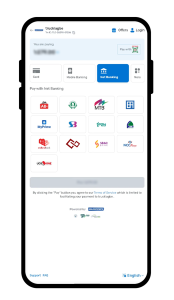
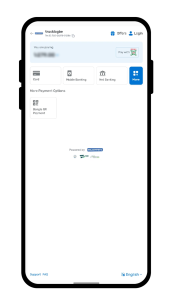
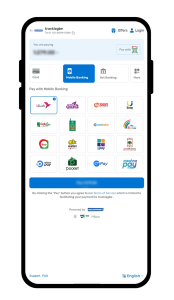
10. Follow the on-screen instructions of your chosen payment provider to authorize and complete the transaction. For example, a bKash payment may require account confirmation and PIN verification. Never share your PIN or verification code with anyone.
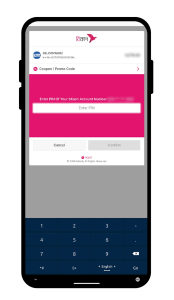
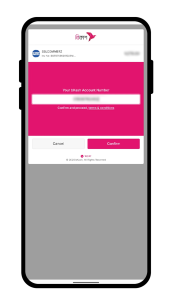
11. After payment, return to the Truck Lagbe Owner app and check the subscription status of the selected vehicle. Once the subscription is active and the tracking device is connected, you can use the app to monitor the truck.
How to track your truck’s location in the Owner app
Once your truck has an installed TL Tracker device and an active GPS tracking subscription, you can access its location from the same app you use to manage truck trips.
- Open the Truck Lagbe Owner app and go to the truck list (লিস্ট) or map view (ম্যাপ).
- Find the vehicle showing an active GPS tracking status. In the list view, active vehicles show a blue “ট্র্যাক করুন” (Track) button.
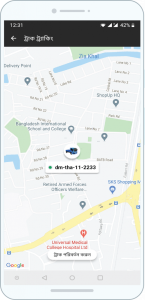
- Tap “ট্র্যাক করুন” (Track) for the truck you want to monitor.
- View the vehicle’s location on the map and use the tracking features available with your subscription.
What can you do with TL Tracker?
The subscription screen in the Owner app lists these features. What you get can depend on your device and package.
| Feature | What it helps with |
|---|---|
| Live tracking and live traffic | See where the truck is now and the traffic on its route |
| Live speed monitoring and overspeed alerts | Spot fast or risky driving |
| Trip history | Check past routes, stops, and idle time |
| Engine on/off alerts | Know when the truck starts or stops |
| Device power-cut and low-battery alerts | Learn at once if the tracker is disconnected |
| Geofencing | Get an alert when the truck enters or leaves an area |
| Live location sharing | Share the truck’s position with a shipper or receiver |
| Basic GPS reports and tracker status | Review usage and check the device is working |
| Customer support | Get help with the device or app |
The app’s feature screen also shows a 30-day history, daily summary SMS, engine lock/unlock, and hard-braking alerts. For a full walk-through, read our post on the advanced features of TL Tracker, and see how the Grameenphone network partnership improves TL Tracker coverage.
How truck tracking helps your business
A tracker turns guesswork into facts you can act on.
- On-time delivery. You can tell a shipper exactly where the goods are, instead of calling the driver.
- Safer driving. Speed alerts and trip history show who drives fast or brakes hard, so you can talk to the driver before it leads to an accident, a speeding fine, or lost licence points.
- Theft and misuse. Power-cut and engine alerts warn you if someone disconnects the tracker or moves the truck without permission.
- Lower costs. Idle time and route history show where fuel is being wasted, and with diesel at Tk 135 a litre, every hour of idling adds up.
- More trips. Because tracking sits in the same app where you find trips for your truck, it is easier to plan the next load and the return trip.
Truck owner Mossaddek Shaheb uses it to manage a fleet of 11 trucks; read how TL Tracker helps him grow his trucking business.
Is a GPS tracker mandatory for trucks in Bangladesh?
From 1 August 2026, BRTA requires a working GPS device on all public transport, and it will not grant new registration or renew a fitness certificate without proof, Dhaka Times and Bangla Tribune reported. The notices as reported refer to public transport and do not clearly include goods trucks, and BRTA keeps its own list of approved tracking providers. Before your next fitness renewal, ask your BRTA circle office whether your truck needs GPS proof and which providers it accepts.
Start tracking your trucks with Truck Lagbe
With TL Tracker, finding trips and following your trucks happen in one place: the Truck Lagbe Owner app. Call 09638000245 to get a device installed, or order a GPS tracker with subscription from TL Shop. Keep the subscription active so tracking and alerts keep working, and renew it in the app before it expires.
Frequently asked questions
How can I track my truck’s location in Bangladesh?
Install a TL Tracker GPS device, activate a GPS subscription in the Truck Lagbe Owner app, then open the Truck Location tab and tap Track on the truck.
How do I renew my TL Tracker subscription?
In the Owner app, open Truck Location, then List, and tap Renew (রিনিউ করুন) on the truck. Choose a package, select the trucks, confirm, and pay through SSLCommerz.
Can I pay for TL Tracker with bKash or Nagad?
Yes. The SSLCommerz checkout offers mobile banking, including bKash and Nagad when available, as well as cards and net banking.
Can I renew several trucks at once?
Yes. On the package screen, tick every truck you want to renew. The app shows the number of vehicles and the total bill before you pay.
Why can’t I see the Track button for my truck?
The subscription may have expired, or the device may not be connected. Renew the subscription in the app, or call 09638000245 if the device is offline.
Do I need a separate app for TL Tracker?
No. Tracking works inside the Truck Lagbe Owner app, the same app you use to take trips.
Is a GPS tracker mandatory for trucks?
From 1 August 2026, BRTA requires GPS on public transport for registration and fitness renewal. The reported notices do not clearly cover goods trucks, so check with your BRTA circle office.